
Overview of a Display-Oriented Editor for INTERLISP
Proceedings of the Seventh International Joint Conference on Artificial Intelligence. Programming Environments. Pages 927-928.
© 1981 International Joint Conferences on Artificial Intelligence
Abstract
DED is a display-oriented editor that was designed to add the power and convenience of display terminals to INTERLISP's teletype-oriented structure editor. DED divides the display screen into a Prettyprint Region and an Interaction Region . The Prettyprint Region gives a prettyprinted view of the structure being edited; the Interaction Region contains the interaction between the user and INTERLISP's standard editor. DED's prettyprinter allows ellision, and the user may zoom in or out to see the expression being edited with more or less detail. There arc several arrow keys which allow the user to change quite easily the focus of attention in certain structural ways, as well as a menu-like facility for common command sequences. Together, these features provide a display-facility that considerably augments INTERLISP's otherwise quite sophisticated user interface . [Note : an extended version of this paper, a user's manual, and source files arc available from the author.
- II Barstow, I> ., Shrohc, II., and SatHkwall. 1:. kd s . l ln!Naclil't' Programming Fnl'irfll/111<'11/s, Ml•( ira11 - llill. 19!!1. 121
- Moon , D., "The MacLisp Rcferenn: Manual ", MIT AI Lab, 1974.
References were extracted automatically from the PDF and may contain errors.
Full text extracted automatically from the PDF; figures, tables and equations may differ. The PDF is the version of record.
OVERVIEW OF A DISPLAY-ORIENTED EDITOR FOR INTERLISP
David R. Barstow
Schlumberger-Doll Research Ridgefield, Connecticut
bring some of this power and comfort to the INTERLISP environment.
ABSTRACT
DED is a display-oriented editor that was designed to add the power and convenience of display terminals to INTERLISP's teletype-oriented structure editor. DED divides the display screen into a Prettyprint Region and an Interaction Region . The Prettyprint Region gives a prettyprinted view of the structure being edited; the Interaction Region contains the interaction between the user and INTERLISP's standard editor. DED's prettyprinter allows ellision, and the user may zoom in or out to see the expression being edited with more or less detail. There arc several arrow keys which allow the user to change quite easily the focus of attention in certain structural ways, as well as a menu-like facility for common command sequences. Together, these features provide a display-facility that considerably augments INTERLISP's otherwise quite sophisticated user interface.
[Note : an extended version of this paper, a user's
manual, and source files arc available from the author.)
I INTRODUCTION
Although programs are written in a programming language, the human process of programming often occurs within a program.ming environment -- a set of software tools that assist in different aspects of the programming process [I). A major feature of the INTERLISP [2) environment is a structure-oriented editor whose commands operate on structural objects (e.g., atoms, S-exprcssions) rather than on textual objects (e.g., characters, lines) . These commands deal with and modify in-core S-expressions rather than external textual representations. INTERLISP's editor has evolved into a highly sophisticated tool. It's sophistication, however, is marred by one major drawback: it is built around a teletype-style interaction . If you wish a visual presentation of the expression being edited, you must explicitly request that it be typed out on the terminal. While this made sense when INTERLISP was originally developed (the late 1960's when display terminals were rare), it is now a hindrance, since display technologies can add considerable power and comfort to a human interface. A display~oriented editor (called DED) has been built to DED includes the following features :
- The display screen is divided into two regions: one is for the standard style of interaction with INTERLISP's editor; the other gives a prettyprinted version of the expression being edited.
- The prettyprinter allows ellision: the most detailed parts of the prettyprinted expression arc shown in abbreviated form.
- The user may zoom in or out to see the expression
- with more or less detail.
- There are several "arrow" keys which can be used to move the "cursor" on the prettyprinted expression (in addition to INTERLISP's usual attention changing commands).
- A menu-like facility allows common command sequences to be entered quickly.
Together, these features provide a display facility which considerably augments INTERLISP's editor. Users have found it quite easy to learn and have not felt that it disrupts those aspects of INTERLISP that they already use. Thus, the original goal of DED has been achieved: much of the power of display terminals has been added to INTERLISP without losing the structural orientation of the editor and without forcing radically new patterns of behavior onto users. INTERLISP with DED thus represents one solution to the problem of combining a program's visual representation with structural editing. (MACLISP/EMACS [3), [4) and the Cornell Program Synthesizer [5) represent alternative solutions to this problem.)
II THE USER'S VIEW
The user interface to DED is a character-oriented display terminal with 24 lines of 80 characters each . The 24 lines are broken into two main regions: the Prettyprint Region and the Interaction Region . The Prettyprint Region contains a prettyprinted version of the expression being edited . INTERLISP's current focus of attention is indicated within the Prettyprint Region hy highlighting the enclosing parentheses. The Interaction Region contains the interaction between the user and INTERLISP's standard editor (i .e., the prompt characters. the user's typed command, and INTERLISI''s response> . For example, Fig. I shows the
I
I
·-·---·-- ·-·--·--··------··---- _ I
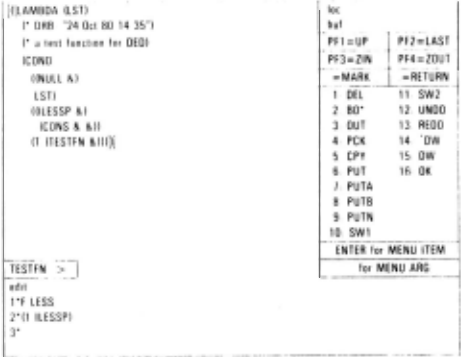
screen when the user is editing the definition of the function TESTFN. Note that the definition is not printed in full detail ; omitted subexrpessions are shown as "&" in the Prettyprint Region.
DFD allows the user to zoom in to sec specific suh<.!xpressions in more detail. In order to indicate the location of the displayed expression within the entire expression, the CARs of the nested expressions surrounding the displayed expression are shown in the line kalled the "zoom line") separating the Prettyprint Region and Interaction Region . The zoom out command causes DED to redisplay the expression which was displayed prior to the most recent zoom in command. That is, DED maintains a stack of displayed expressions; zooming in corresponds to a push operation, zooming out corresponds to a pop operation .
DED always ensures that the user's focus of attention is a subexpression of the expression displayed in the Prettyprint Region . Thus, for example, if a search command shifts the focus of attention to an expression not contained in the current expression, DED zooms out until the displayed expression contains the new focus, and then, if necessary, zooms in to an expression such that the new focus is visible despite the ellision of the prettyprinter .
In order to facilitate moving about within an expression DED includes several single-key commands to change the focus of attention . These include keys to move up and down levels, and right and left within a level. None of these keys ever causes the focus of attention to move outside of the currently displayed expression. An unusual feature of these keys is that some other action is performed if the normal one does not fit the context. ror example, if the current focus of attention is on the last element of a list, the right arrow moves up a level before moving to the next clement.
Editing with DED is carried out either hy issuing standard INTER LISP commands, or hy using a menu like facility (the upper right corner of Fig. I) for special structure modifkation commands (e .g., moving an expression from one place to another) .
III NOTES ON THE IMPLEMENTATION
A. The Display Chain
INTERLISP's editor was originally based on the concept of a "current expression", that part of the structure which is the user's current focus of attention. To this , DED adds a "display expression", the part of the structure which is displayed at a given time. DED is built so that the current expression is always within (that is, a substructure of) the display expression. In order to keep track of the location of the current expression within the top expression, INTERLISP's editor uses a structure called an. "edit chain", which is a list of expressions. The first expression is the current expression, the last expression is the top expression, and each expression on the list is either a member or a tail of the expression following it on the list. Thus, the edit chain provides a stack of nested expressions, leading from the top expression to the current expression . In a similar manner, DED maintains a "display chain," a stack of nested expressions to be displayed . Expressions arc added to and removed from the display chain as the user zooms in and out. The display chain is always a subsequence of the edit chain.
B. Extending DED to Other Display Devices
DED was built to use a DEC VTlOO terminal. There are three features of the VTI 00 that are crucial to bED's success: arbitrarily many portions of the screen may be highlighted (using reverse video); the current cursor location may be requested from the terminal; and the scrolling region may he restricted . In an attempt to gain device independence, all of DED's interactions with the display are controlled by a table describing the appropriate protocols for different features . This technique permitted DED to be extended to a Zenith (Heathkit) terminal quite easily.
After DED was finished, a small experiment was performed to test the feasibility of extending it to run on a bitmap display (a Xerox Dolphin) . This turned out to be simpler than expected, involving essentially a mapping between character positions and bit positions. More interesting was the attempt to use a mouse (rather than arrow keys) to indicate changes in the focus of attention . Although the experiment has not yet been completed, it has become clear that a pointing device , especially when combined with a sophisticated menu system, was a significant improvement over the VTlOO interface.
IV LESSONS AND SURPRISES
Building programming environments is inherently an experimental process ·· it is simply impossible to determine beforehand the appropriate way for an environment to appear to the user and to respond to his/her requests. DED is the second display-editor I have buill for INTERLISP (but the first that I actually usc) . The following arc the major lessons to be learned from the DED experience. (They reflect primarily my own experience in using LJED, but also the collected experiences of a small but growing user community.)
- Automatic zooming to ensure that the focus of attention is always visible is surprisingly valuable.
- The zoom line as a way of determining the location of .the displayed expression within the entire expression is surprisingly unimportant.
- The arrow keys, especially with their secondary definitions, arc a convenient way to change the focus of attention if no pointing device is available.
A final observation is that my editing syle has changed considerably. The prettyprinter with ellipsis provides (for me, at least) a comfortable level at which to view a form ·· so comfortable that I find myself referring much less frequently to hardcopy listings. Adding display facilities to INTERLISP's structure editor has oriented my editing style much more toward intcractivity than it ever was in the past.
ACKNOWLEDGEMENTS
Steve Wesfold and Bill van Melle have made many helpful suggestions. Feedback from the INTERLISP community at SUR has also been quite valuable .
@inproceedings{ijcai1981p176,
  title     = {Overview of a Display-Oriented Editor for INTERLISP},
  author    = {Barstow, David R.},
  booktitle = {Proceedings of the Seventh International Joint Conference on
               Artificial Intelligence, {IJCAI-81}},
  publisher = {International Joint Conferences on Artificial Intelligence},
  editor    = {Patrick J. Hayes},
  pages     = {927--928},
  year      = {1981},
  month     = {8},
  note      = {Programming Environments},
  url       = {https://ijcai.org/proceedings/1981/176},
}
TY - CPAPER TI - Overview of a Display-Oriented Editor for INTERLISP AU - Barstow, David R. T2 - Proceedings of the Seventh International Joint Conference on Artificial Intelligence, IJCAI-81 PB - International Joint Conferences on Artificial Intelligence PY - 1981 SP - 927 EP - 928 UR - https://ijcai.org/proceedings/1981/176 ER -Copied
Machine-readable versions of this paper, for tools and AI agents:
 Welcome
 Future Conferences
 AI Journal Division
 IJCAI Proceedings
 About IJCAI
 IJCAI Awards