A Display Oriented Programmer's Assistant
Proceedings of the Fifth International Joint Conference on Artificial Intelligence. Languages and Systems. Pages 905-914.
© 1977 International Joint Conferences on Artificial Intelligence
Abstract
This pa per continues a nd extends previous work by the auth or in develo ping sys tem s which provide the user with various forms of exp li cit and implicit assistance, and in ge nera l cooperate with the user in the development of his programs. The sys tem described in this paper makes extensi ve use of a bit map display and pointing device (a mouse) to signif ica ntl y enrich the user's interactions with the sys tem, and to provide capabilities not possible with terminals that essentially emulate hard copy devices. For example, a ny te xt th at is displ ayed on the screen can be pointed at a nd treated as input, exactly as though it were typed, i.e ., the user can say use this expression or that value, and th en simpl y point. The use r views his programming environment through a collection of displ ay windows, each of whi ch corresponds to a diff erent t as k or co ntext. The user can manipulate th e windows, or th e co ntents of a particular window, by a combination of keyboard inputs or pointing opera ti ons. The technique of using different windows for different ta sks ma kes it easy for the user to nl3nage several sim ultaneo us t as ks and contexts, e.g., defi ning programs, testing program s, editing, asking th e system for ass istance, se ndin g and receiving messages, etc. and to sw itch back and forth between the se tas ks at his convenience.
- English, W. K., Engelbart, D. C., and llerman, M,; L.., "Display Selection TeclllliCJUCS for T ex t MampulatJOn, 1/::t'E Transacliol! s on Human Fac/ors in E/eclronics, Vol. H FE-8, No. 1, March 1967.
- '!'The second part of the session. whid1 s ho"'s more sophi slicatcd usc of th e above fcawres in the context of an aclunl working session involving finding :lnd fixing bugs, testing programs, se nding :tnd n:cciving messages, etc., may be found in an expanded version of thi s pape r "vailablc as a Xerox CSL Report. A Di splay Orient ed Prog ramml'l''s Assistant, by Warren Teitetman.
- San] Sandewall. E. "Programming in an Interactive Environme nt: The Li sp E:.xpcrience," Matematiska lnstitutionen, University of Linkoping, Sweden. (to be published in CACM).
- Sproull, R. F .. and Thomas, E. L., "A Network Graphics Protocol," Compuler Graphics, SIGGRAPH Quarlerly, Fall 1974.
- Swinehart, D. . C .. "Copilot: A Multi~!e , Process Approach to Interactive Programming Systems, Stanford Artifici al Intellige nce Laboratory Memo AIM-230, Stanford University, July 1974.
- Teitelman , W. "Toward a Programming Laboratory," in Walker, D. (cd.) I nlenwlional Join/ Conference on Artificial Intelligence, May 1969. IJCAI
- Teitelman , W. "Automated Programmering -T~e Programmer's Assistant," Proceedings of the Fall Jo111t Co1~puter Conference, December 1972.
- Teitelman , W. "CUSP -Conversational Lisp," Third lnternaliunal Joint Conference on Arlificia/ lnlelligence, August 1973.
- Teitelm an, W. et al., lnler/isp Reference Manual, Dec. 1975, Xerox Palo Alto Research Center.
References were extracted automatically from the PDF and may contain errors.
Full text extracted automatically from the PDF; figures, tables and equations may differ. The PDF is the version of record.
Introduction
Li sp systems have been used for highly interactive programming for more than a decade:j· During that period, much effort has been devoted to developing tools and techniques for providing powerful interacti ve support to the programmer. The lnterlisp programming system [Tei4] represents one of the more successful projects aimed at developing a system which could he used by researchers in computer science for performing thei r day to day work, and cou ld also serve as a testbed for introducing and evaluating new ideas and techniques for . providi ng sophisticated forms of programmer assistance. lnterlisp on the PDP-10 is curren tly used by programmers at over a dozen ARPA network sites for doing resea rch and development on adv::111ced artif icial intelligence projects such as speech and langwtge understanding, medica l di agnosis, computer-aided instruction, automatic programming, etc. Implementations of lnterli sp on several other machines are currently planned or in progress.
This paper describes a system written in lnterlisp which extend> the ln ierl isp user faciliti es to take advantage of a dl splay:j""f The paper is not an "idea" paper in the sense that Arti f icial Intell igence papers usuall v are. lnslt!act . this
tAn excellent survey of the state of I he art may be found in [San].
t"fThe author would like to acknowledge and thank R. F. Sproull and J Slrother Moore, who designed and implemented crilical support facilities without which lhi s syslem would nol have been possible, and whose ideas and iniUitions provided extremely valuable guicl:tncc and inspiration d uring the development of the system. The form and capabilities of some of the display primitives in the currenl system were suggested by an earlier version of a display text facility for lnlerl isp d.signed by Terry Winograd. Finally. all of the work desc ribed herein depends heavily on the leverage provided by the luterli sp system ilself. which is the result of the efforts of manr indi viduals over a period of almost a decade. made pos$i ble by continuing ARPA support over that period.
paper descri bcs a working sys lern whi ch implements and intc~rates a number of' id c<~s and techniques previously rcpt)rted in the literature by several differen t individuals, includ ing the author. The idea of a display composed of multipl e, ovcrlappin:>, regions calkd "windows" is attri butable to and an essential part of the Smalltalk programming system designed and implemented by the Le~orning Research Group at Xerox Resea rch Center [LRG]. In particul ar, much of the way that windows are used in the system described here was influenced by the work of Dan ln"alls on the Smalltalk user interface. The idea of using the di ~play as a means for allowing the user to retain comprehension of complex program environments, and to monitor several simultaneous tasks, can be found in the work of Dan Swinehart [Swi]. The use of the "mouse" as a pointing device for selecting portions of a display goes back to the early work on NLS [Eng]. Finally, the techniques used for automatic error correction and the idea of having the user interact with the system through an active intermediary which maintains a hi story of his session, both of which appear in thi s paper, are par ts of the standard lnterlisp system [Tei1][Tei2]. The work reported in this paper is of interest primaril y in how the rea lization of these various ideas in a single, integrated, Working system
dramatically confirms their value.ttt
The system described in this paper is implemented on a version of lnterli sp [Tei4] running on MAXC, a compater at the Xerox Research Center in Palo Alto. This computer emulates a PDP-10, and runs the Tenex operating system, so that from the standpoint of the user, the system he is using is lnterlisp-10. The raster-scan display used by the system described in this paper is maintained by a separate 65K 16 bit word mini-computer. The minicomputer is linked to MAXC through an internal network, and implements a graphics protocol si milar to the Network Graphics Protocol (Spr], but specialized for text and raster-scan images. All of the work described in thi s paper deals with the "high end" of the system, i.e., the user interface, and is written entirely in Inter lisp.
The user communicates with the system ·usi ng a standard typewriter-like keyboard. In addition, he has available a pointing device commonly called a "mouse" [Eng] used for poi nting at particular locations on the screen. for those unfamiliar with this device. the mouse is a sma ll object (about 3" by 2" by I") with three buttons on its top. The system gives the user con tinuous feedback as to where it thinks the mouse is pointing by displaying a cursor on the screen. The user sl ides the mouse around on his working surface (caus ing bearings or wheels on the bottom of the mouse to rotate), and the system moves the cursor on the
"fi"tWhen I first began work in 1969 on what was to become DWIM, the auiOmatic error correction facility of lnterlisp, by implementing a primitive spelling corrector which would automa ticall y correct a certain class of user spel ling errors. I di scussed thi s project at length with a colleague ove r a period of months. One day soon after this facility was finally compleled 110d installed in our Lisp syslem. this same colleague rushed to my off ice and in great excitement exclaimed that the system had corrected an error. I was surprised at his enthusiasm, since we had been di scussing thi s system for months. He replied. "'Yes, but it really did it!" The system described herei n implements ideas that many of us have long been saying would be a good thing to have. And they really arc!
tlispl<·y. The us~r indicates that the mouse has nrrived at some desired location by pressing one of the three buttons on the top of the mouse. The interpretation of the buttons depends on the particular program listening to the mouse. For example, when the mouse is positioned over a piece of text, and one of its buttons pressed. the corresponding text is "selected." Such selections arc indicated by inverting the text, i.e., displaying it as white characters on a black background.
The user interacts with the system either by typing on the keyboard, or by pointing at commands or expressions on the screen, or an asynchronous mixture of the two. In particular, any material that is displayed on the screen can he selected and then treated as thought it were input, i.e., typed.
The ability to he ahlc to select, i.e., point at, material curr(·nlly t!ispla:; t·<l <!::!! c:msc it to llc treated as input is e\:re :.<d:> l.;sefd, <!11<1 :;i(;,;;tions where such a facility can be u~~~·d e~ .. .-r ! ~.· tery often d~ii'iu;; iiH: Cfi '.irsc of an inten~ctive ~cssion.
Why is such a facility useful? Because most interactions with a programming system arc not indcpend~ nt, i.e., each "event" hears wme relationship to what transpired before, usu:::lly to a fairly recent event. Ucing able to point at (portions of) thtse events effectively gives the user the power of pronoun re}erence, i.e., the user can say use this expression or that value, and then simply point. This drasti ca lly reduces the amount of typing the user has to do in many situations, and results in a considerable increase in the effective "bandwidth" of the user's communication with his programming environment.
The user views his environment through a display consisting of several rectangular display "windows". Windows can be, and frequently are, overlapped on the screen. In this case, windows that arc "underneath" can be brought up on top and vice versa. The resulting configura,ion considerably increases the user's effective working space, and also contributes to the illusion that the user is viewing a desk top containing a number of sheets of paper which the user can manipulate in various ways.
One facility provided by these windows that is not available with sheets of paper is the ability to scroll the window forward or backward to view material previously, but not currently, visible in the window. Thus a single winuow can be used to view and manipulate a body of text that would require many sheets of paper.
Each window corresponds to a different task or aspect of the user's environment. For example, there is a TYPESCRIPT window, which contains the transcript of the user's interactions with the Lisp interpreter through the programmer's assist«nt, a WORK AREA window which is used for editing and prettyprinting, a lltSTORY window, a !lACKTRACE window, a MESSAGE window, etc. Using different windows for different tasks
... makes it easy for the user to manage sc1·eral simultaneous tasks and ~:ontcxts, Sllilching back and forti1 bctwt·cn them at his convenience.
Being able to switch back and forth between tasks results in a relaxed and easy style of operating more similar to the way people tenu to work in the absence of restrictions. To use a programming metaphor, people operate somewhat like a collection of coroutines corresponding to tasks in various states of completion. These coroutines nrc continually being activated by internally and externally generated interrupts, and then suspended when higher priority intarupts arrive, e.g., a phone call that interrupts a meeting, a qui<:k question by a colleague that interrupts a phone call, etc. Our previous experience with lnterli sp supports the contention that it is of great value to the us·:r to be able to switch b:~ck and forth quickly between related tasks. The system dcscribell in this paper makes this espec ially convenient, as is illustrated in the sample ses~ion presented in the body of the p:1per.
One technique heavily employed throughout the system is the usc of menus. I\ menu is a type of window that causes a specil'kcl operation to be perfo1 mcd when a selection rnade in that window. iv1cnus serve a number of important fut~ctions. They mak<: it easy for the user to specify an operation without having to type. They act as <\ prompt for the user by providinG him with a repertoire ul' commands from which to cheosc. For example, often a user will not remember the nam·: of a cotntnand, or may not even be aware of the ex istcncc of a command.
llowcvcr, most importantly, me1111s greatly facilitate context swilching. As with most systems. the interpretation of the user's keystrokes (with the exception of interrupt characters which usually have a globally defined effect) depends on the state of the system. For example, when addressing the Lisp interpreter, the characters that the user types are used to construct Lisp expressions which are then evaluated. When using the editor, the characters are inserted in the indicated expression, etc. The important point is that once the user starts typing. he normally has to complete the operation or abort it. However, by selecting a menu command using the mouse. even in the midst of typing, the user can temporarily suspend the operation he is performing, go off and do something else, and then return and continue with his current context. This is also illustrated in the sample session below.
Since so much of the utility of the system described in this paper rest on visual effects. it is difficult to transmit the feel and smoothness of the system through words. Therefore, the form chosen for presenting the system in this paper is to take the reader through a sample session with the system, using frequent "snapshots" of the display as a substitute for the actual display itself. This session is divided into two parts. The first part is a "toy" session, in that the user is not performing any serious work. It is included only to introduce the salient features of the system. The second part of the session shows some more sophisticated use of these features in the context of an actual working session involving finding and fixing bugs, testing programs, sending and receiving messages, etc.
For readers not familiar with Li sp, please ignore Lisp related details (which we have tri ed to minimi1c). The important point is the w:w the systr:m allows the user to switch back and forth between several tasks and contexts. Such a facility would be useful in any programming environment.
Sample Session - Part I
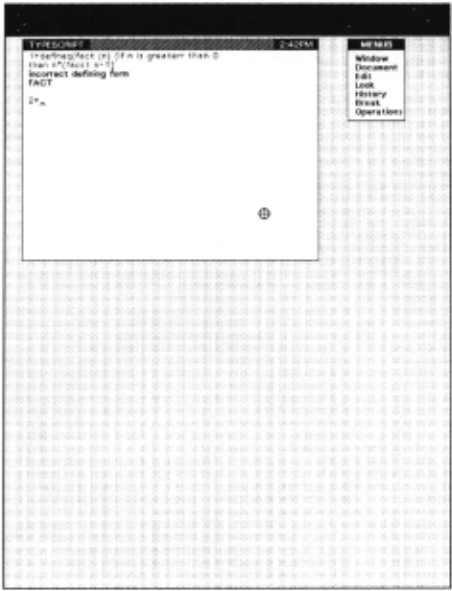
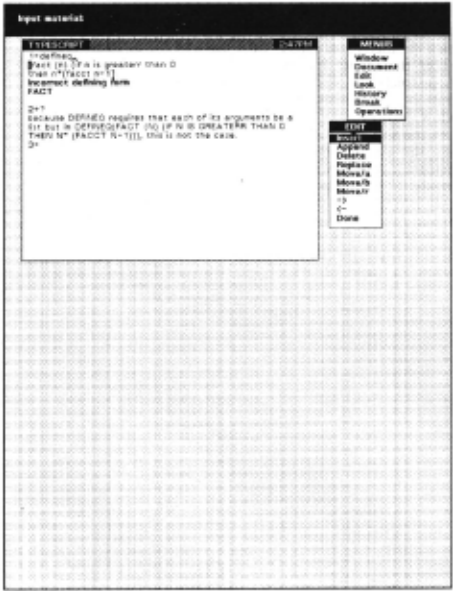
- Figure 1 shows the initial configuration of the screen. Three windows are displ:lyed: the TYPESCRIPT window, which records the user's interactions with the programmer's assistant and the Li sp interpreter; l.he PROMPT window, which is the black region without a caption at the top of the screen used for prompting the user; and a menu, which is the smaller window with caption MENUS to the right of the TYPESCRIPT window.!" A menu is just like any other window, except that whenever a selection is made in a menu, a specified operation is also performed. This particular menu is a menu of menus, hence its caption. If the user selects one of its commands, each of which is the name of a menu, the corresponding menu will be di splayed at the location he indicates. He can then select, and thereby perform. commands on that menu. The crosshairs shape in the lower right hand port ion of the TYPESCRIPT window is the cursor, and indicates the current position of the mouse.
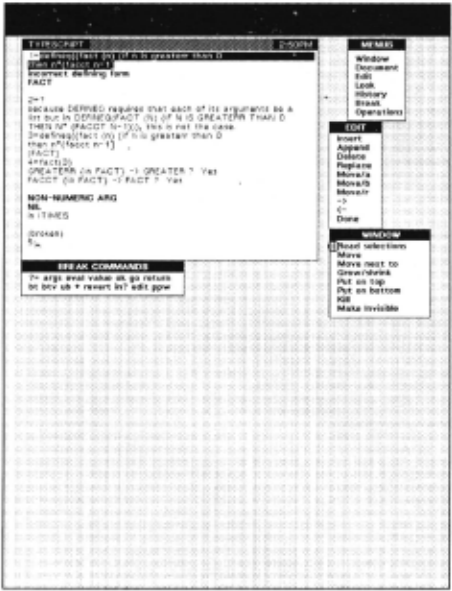
In Figure 1, I have just typed in a Lisp definition for the function FACT (factorial). Lisp has given me the error message "incorrect defining form" (di splayed in bold face to set it off). The system displays a blinking caretti' to indi cate where the nex t character that I type. or the system prints. will be displayed. In Figure 1. the caret now appears immediately following the "2 .. ", where 2 is the event number for my next interaction with the programmer's assistant, and +- is the ''ready" character.
- I don't understnnd what caused thi s error, so I type ? to the p.a. (programmer's assistant), requesting it to supply adctition:.l explanatory information. The p.a. looks at the previous event to determine the: nature of the error. In this caS<\ using built-in information about the arguments to DEFI NF(l , the p.a. tell s me that the problem is that DEFINF.Q encoun tered an atom where 'it expected a li st. i.e., a left par~nthcscs is missing from in front of the word "fact".'!'!"'!' Since the programmer's assistant is maintaining a history of my interac tions with the system, I don't have to retype the f>f+I I'H'() expression. Instead, I can edit what I have already typed. and simply insert the mi ssing left parenthesis. The H) IT 111enu will allow me to perform va rious editing opera ti ons using the mouse for pointing and the keyboard, where necessa ry, for supplying text. In Figure 2, I have already mov~::d the mouse so that the cursor is positioned over the FDIT command on the MENUS menu, in preparntion for "bringing up" the EDIT menu.
i'The "plaid" effec t of the backgrounu in the figure< is an a rtifact of the n:pwduction/redut..· liun process. The actual b<~d:3round on the di splay is ;1 uniform grey.
i' 'f In these figures. the ca ret is always shown in its "on" position.
'!' i"i'lf the p.a. did no t know anything about this particular error. it would rl'fc r to the index of the o n-line lnterli sp Reference Manual and present l_ h~ cu_r.respond ing text as;.ociatcd with the er ror mc~sage by way of cxpl:tna tmn. I he user can also :lllr,mt.'nt thC' built-in information that the p.:1. has Jbouc sy~H<: IH functi ons hy infurmine, the p.:l. about the requirements of his own functions. lie can then usc the ? command to C."\ plain errors in hi s own programs.
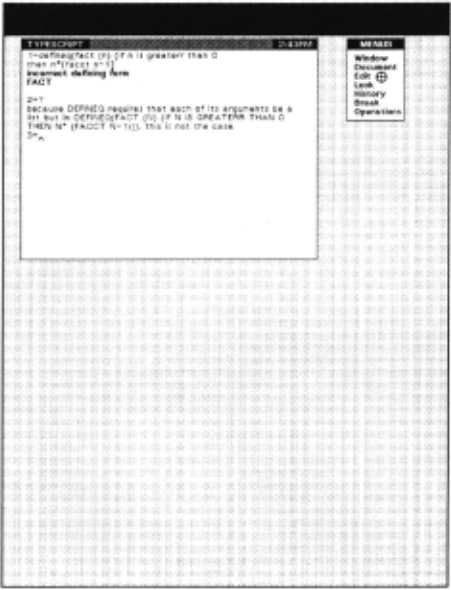
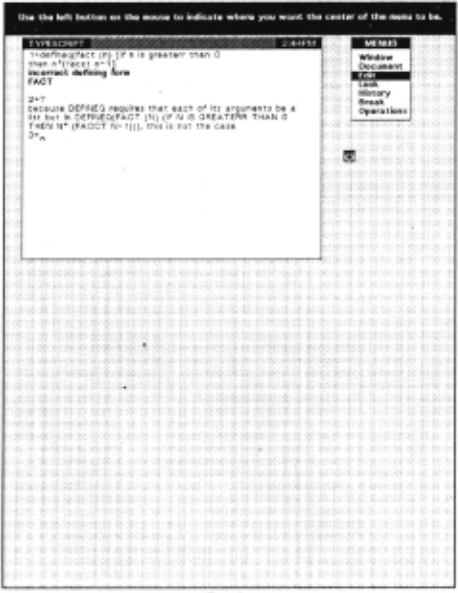
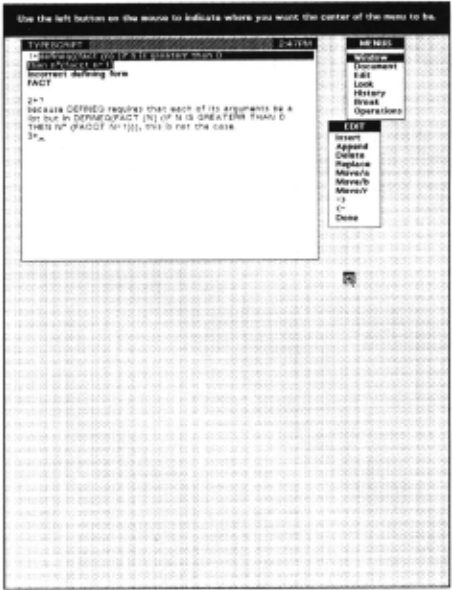
- I press a button on the mouse to select the EDIT command in the MENUS menu. The system indicates the selection by displaying EDIT as white on black. The PROMPT window tells me to use the left button on the mouse to indicate where I want the center of the (EDIT) menu to appear. The cursor is changed to an icon of a menu with a cross in its center to suggest the operation that is pending. At this point, I don't have to complete this operation. I can type in other expressions to the programmer's assistant, perform other menu operations, etc. The process which is waiting for me to supply the indicated information is simply a co-routine which has been suspended.t However, since I want to fix up the DEFINEQ expression before going on to anything else, I move the cursor to the position at which I want the EDIT menu to appear, which is below the MENUS menu and to the right of the TYPESCRIPT window, as shown in Figure 3.
- I press the left button on the mouse, causing the EDIT menu to appear at the location of the cursor. In this position, the EDIT menu slightly overlaps both the TYPESCRIPT window and the MENUS menu. so the system automatically adjusts the EDIT menu by sliding it off these windows to its location as shown in. Figure 4.'!''1'
tsee dcscript;un of the "Spaghetti Stack" facility in [Hub] and [Tei4].
- ·j .. j·l could force the EDIT menu to overlap the TYPESCRIPT window by po'iitioning it exactly usi ng one of the comm:tnds on the WINDOW 11ll'llll. Howeve r. since in this c~se I only positiont:d the menu approximately. the system tries to "Do What I Mean". a philosophy of sy ~.tcm dcsirn \'r'C have tru:d to fulluw throughout the lnterli sp system [Teil].
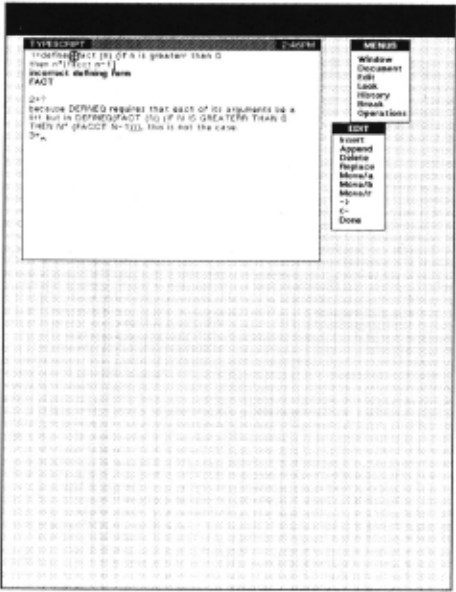
- Now I am ready to edit. I select the left parenthesis in the first line of the TYPESCR IPT window, and then select the INSERT command on the EDIT menu. The line of text in the TYPESCRIPT window is broken just before the selection (the left parenthesis), and the caret is moved to that location. The PROMI'T window instructs me to input material. Anything I type will appear at the location indicated by the caret.
- I type in a single left pa renthesis, and terminate the INSERT operation. The line of tex t I have been editing is rejoined, and the ca ret returned to the appropriate location at the end of the TYPESCRIPT window. I now wan t to cause the corrected text to he re-input in order to perform my o rigi nal operation, i.e., define my function . Therefore, I select the text by first se lecting the "d'' in "defineq" and then extending this selection through the fin al "]". Then, using the same method as previously shown for bringing up the EDIT menu, I bring up the WI NDOW menu in o rder to obtain the command for inputting sekcted material.
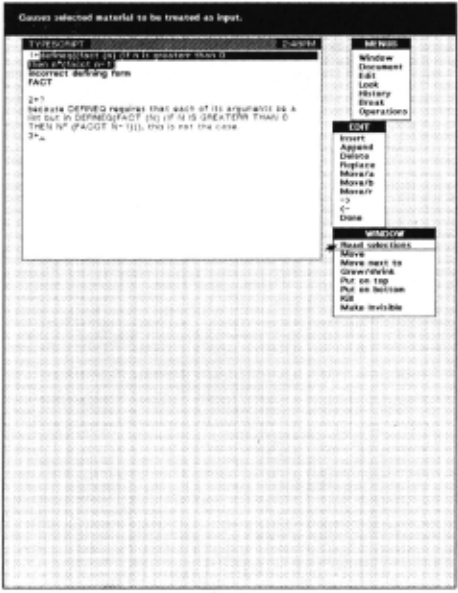
- The WINDOW menu contains the command "READ SELECTIONS" which is the command that I think does what I want. I therefore select this command, but instead of clicking the mouse button, I hold the mouse button down. This instructs the system to tell me wha t it would do if this operation were actually performed. Here, the PROMPT window informs me that the "READ SELECTIONS" command causes the selected material to be trea ted as input. Figure 7 shows the di splay as of this point. The cursor has been changed to an arrow to indicate that a selection is about to be made. The mater ial that would be selected, namely the "READ SELECTIONS" command, is unde rscored. If I want to perform this selection, I simply release the mous<! button. Otherwise, I can move the mouse to another !ocation and release it there in order to perform a selection at the new location, or move it off of the menu entirely to abort the selection.
- I rel ease the mouse button, and the selected material is treated exactly as though I had typed it, i.e., becomes event number 3 and causes the function FACT to be defined. As mentioned before,
This ability of being able to select, i.e., point <lt, material currently displayed and c:n:se it to hr treated as i::;mt is extremely useful, and the situ:1tion:; whrre such :; fac ility can be used occur very often durin;: the ccursc of au in tl'ractiv<· session.
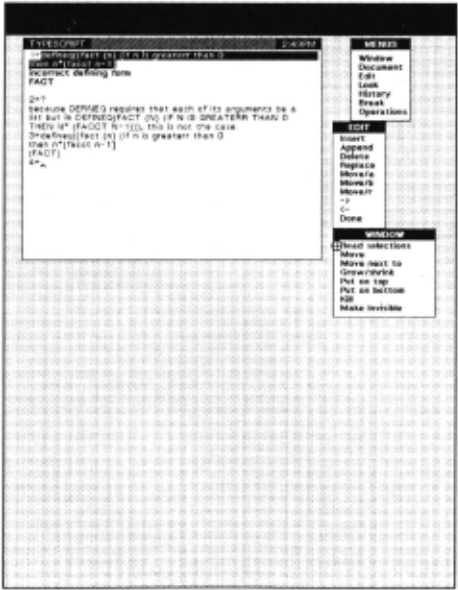
9. I now try out my function by typing FACf(J). At this point, cusP [Tei3] is invoked to translate the if-then expression in the definition of FACf into an equivalent Lisp construct. CLISP runs into a problem rega rding the word GREATERR, and DWIM offers a spelling co rrection. I type Y (the spelling corrector supplies the "es"), and the correction is made. I had also misspelled the recursive call to FAcr in the body of the definition of FACf. Since the programmer's ass istant "noticed" this new f uncti on, i.e., FACT, when I first defined it, DWIM is able to suggest the correction of FACer to FACT. whi ch I a lso confirm. Figure 9 shows the displ ay after these two corrections have been made. At this point, the def inition of FACT has been translated to Li sp successfully, at least from a syntactic standpo int, and an error is encountered which DWIM cannot hand le. The error message NON- NUMERIC ARG NIL is printed, and lnterli sp goes into a break. A menu of break commands automatically appea rs just below the TYPESCRIPT window.
At this point the user is once again addressing the Lisp interp reter through the programmer's assistant. However, the context of hi s computation has been preserved and is ava il able so that the user can, fo r example, examine the va lues of loca ll y bound variables, see the control structure that lead to this po int in the computati on, etc., and if he wishes, fi x or bypass the probl em and continue the computation. Thi s capability is most important for interactive debugging [Tei l]. In this pa rticula r case, the arithmetic opera ti on MULTIPLY (as impl emented by the Lisp f uncti on !TIMES) is wait ing for a number, i.e., the value of the break will be used as a multiplicand. In effect, the system has called the user as a subroutine to supply this number.
10. I select the RTV command, requesting a backtrace of f unct ion names nlor.g with the names and values of the bound va riables fo r each corresponding functi on call. The bac klr:.~ce is p1 in ted in a separate llACKTRACE window, which is autumati call y d ispiayed when the back trace command is invoked. The BACKTRACE window is shown at the right of the screen in f''igure I 0. Note that it overlaps the three menus. Howcva, I can st ill perform operati ons using those menus by p0 inting at th<! pa rt of the menu that is visible. I ca n select clements in the ilACKTRACE window to focus the attention of the break package on a particul ar frame, e.g., to ~:va lua te an express ion in a differe nt contex t, lo cause the computation to reve rt back to that point, ttc. The hackt race ~ hows me that I am under my funct ion FACT, and that it maJe three recursive ca ll s befo re the e rror, with N being dec remented by l each ca ll , so it looks li ke FALT is recursing properly.
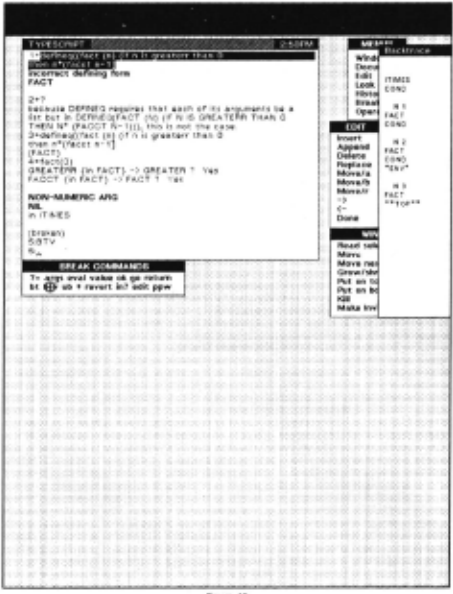
11. I still don't understand why the error occurred, so I try typing the ? command again. In this case, the programmer's assistant tells me that the problem is that one of the operands to · (the MULTIPLY operator) was (FA<.."T N-1) and that the value of . (FACT N-1) is NIL when N=l. In other words, when FACT is called with N=O, it returns NIL. The p.a. is able to generate this explanation because (1) it knows that all of lhe arguments to · must be numbers, and (2) it can examine the state of the computation on the stack.. In this case, it found that the second operand to ITIMES was NIL, which is not a number, and that the expression that produced this particular value was (FACT N-1) in the expression (N·(FACr N- 1)) which is contained in the function FACT, and that at the time this call occurred, the value of N was 1.
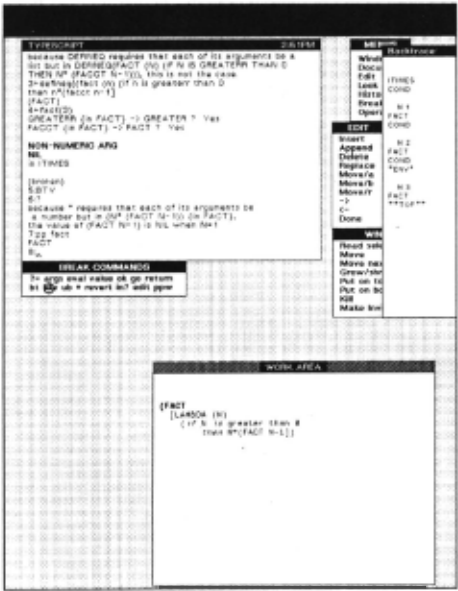
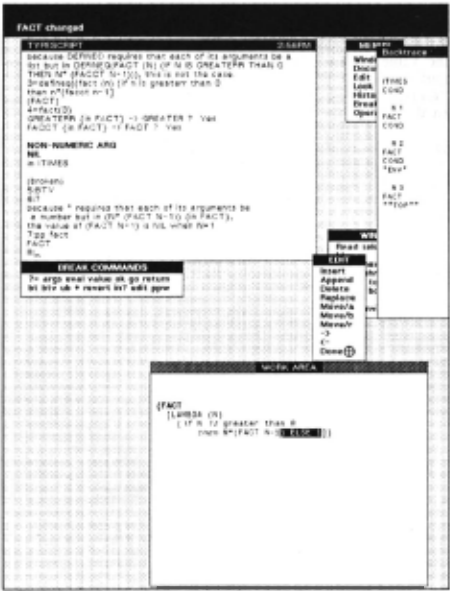
I now realize that the problem is simply that I neglected to specify the value of FACr for N=O:r Therefore, I prettyprint the definition of FACT in preparation for editing it. Figure 11 shows the definition of FACT prettyprinted in my WORK AREA window, which automatically appeared when prettyprint was called. Note that the definition of FACT now shows the two misspelled words, GREATERR and FACCT, spelled correctly.
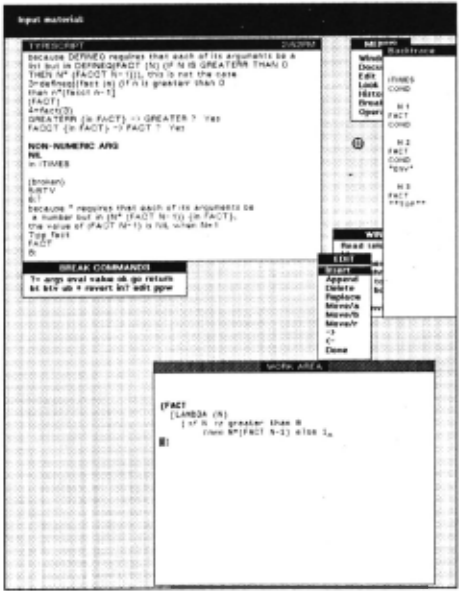
- I select the right square bracket in the definition of FACT in the WORK AREA window, and then select the INSERT comand on the EDIT menu. The EDIT menu automatically moves so as to be close to the window that I am editing. I make the necessary correction by typing ") ELSE !", i.e. if N is not greater than 0, FACT should return 1. Figure 12 shows fhe display just before I complete the INSERT. Note that the caret appears in the WORK AREA window where I am typing. The cursor is in the upper right hand portion of the screen at the location of the INSERT command before the EDIT menu moved to be close to the WORK AREA.
'fin lnterlisp, if none of the predicates of an if-then expression evaluate true, the valu~ of the expression dcf"ulls to NIL.
- I complete the INSERT, and then select the DONE command on the EDIT menu to indicate that I arn finished editing this expression. The PROMPT window reports that the definition of FACT has been changed. Note that I did not have to fini sh editing FACT at this point: I could have typed in expressions to be evaluated. performed other menu operations, etc., even edited other expressions, before selecting the DONE command for this expression. This is another example of being able to suspend different tasks in varying states of completion and go back. to them at some later point.
14. I now test out my change by typing fact(2), which works correctly. Now I want to continue with the computatiOn. Note that I am still in the original break. that followed the error. The a rithmetic operation · (i.e., the Lisp function !TIMES) is still waiting for a number to be used as a multiplicand. I therefore select the RETURN command on the BREAK menu. The PROMPT window tells me to INPUT EXPRESSION and the caret moves to the PROMPT window. I type 1 as the value to be returned from thi s error break. Figure 14 shows the display at this point just after I type l, which is echoed (displayed) in the PROMPT window.
Note: in actual practice, for a computation as trivial as FACT(J) , I would probably simply reset (anort back to the top) and rcexccute FACT(3J rather than bothering to continue the computation, since so little has been invested in getting to this point. However,
bein;: able to continue a comtmtation following an error is estJccially useful when an error occurs following :1 significant amnnnt of comput:1tion, or ·,·, hen the computation has left things in an "uncl l":lll state" as a rl"sult of global sitle effects. Such a facility is also essential for 1:ood interactive ddJugging.
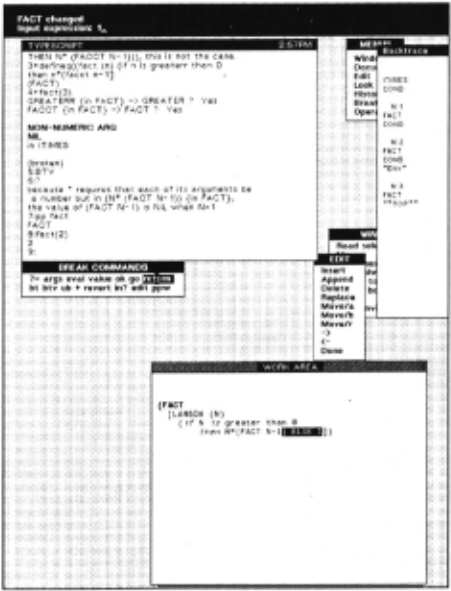
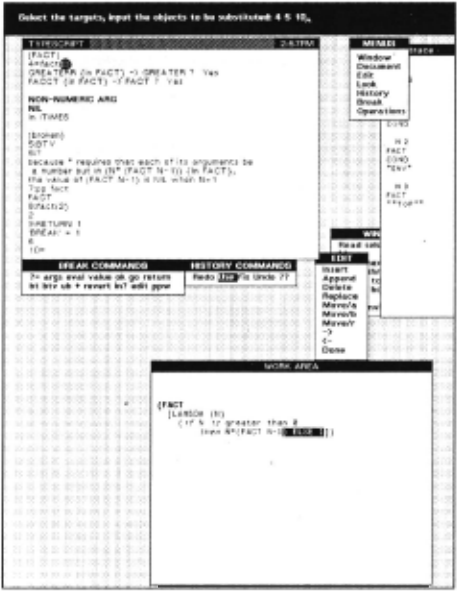
15. I complete typing the expression for the RETURN command, thereby causing 1 to be returned as the value of the break. which causes (l * 1) to be computed and returned as the value of FACT( 1 ). which then causes (2 * 1) to be computed, etc., and finally the original computation of FACT()) finishes and returns 6 as its value as shown in Figure 15, in the next to the bottom line of the TYPESCRIPT window.
I now want to try FACT on some other values, so I bring up the HISTORY menu, and select the USE command, which is a command to the programmer's assistant to reexecute a previous event, or events, with new values. The PROMPT window instructs me to select the targets and to input the objects to be substituted. I select the "3" in FACTO) (near the lop of the TYPESCRIPT window) and input "4 5 10" (echoed in the PROMPT window), i.e., I am requesting that FACf(4), FACr(5) and FACT(IO) be computed.
16. The resulting history operation is equivalent to typing USE 4 5 10 FOR J IN 4:1' which the p.a. prints in the TYPESCRIPT window to show me what is happening. This USE command now causes three computations to be performed, corresponding to the result of substituting 4 for 3 in FACI(.l). the resuil of substituting 5 for 3 in FACT(J), and the result of substituting 10 for 3 in FACT(J). The values produced by these three computations, 2·1, 120, and 3628300, arc printed in the TYI'r~;u,wr window, as shown in Figun: 16. Finally, I ask for a replay of the hi story of my session, by select ing the ?? comnwnJ in the IW>TOf(Y menu. The IJISTORY window is brou ~!, hl up, and the history uf my session, in reverse chronological order, is printed in this window, ;ts shown in Figure 16:1"1·
·1·4 is the event number of li1e event corresponding to FACT(J).
·j·-j- In addition to see ing a rt·pla; of hi s hi story, tll c user can also scrfl tl the (rontents of thd TYPESCR IPT w! ndow hJc k ward :~ in time (r) ~l·e (h(' tr~~rt script of tarli r: r interaction:-. wi th the systc.:m. Tilt: difference hctwccn the hi story and the TYPESCR IPT is that the TYI'FSCR IJ>T contains o record of all c h:n:tc l ~.:rs iuput or output , e.g., includes me:.;sagc:. print t'cl by the sy~ tcm anJ by the u~cr's progr:tnls. The history contains a s uh~ t;t of these..: rharaclt.:rs, urt·.anih.:d acc<Jrding tu n ·£'nts. For t:X;1n1plc, (,, the value r<ct urncd by FACT(.1), actuall y appears I ~ lines below FACT(J) in the TYI'ESCRII'T window. but in the IJISTOR Y window, it would be shown as the value of ~:vent number 4, rcgardkss of the ract that events 5 thru 9 oc~urrl'd between the time that c:vt·nt 4 w~1s begun ;mtl the time it completed.
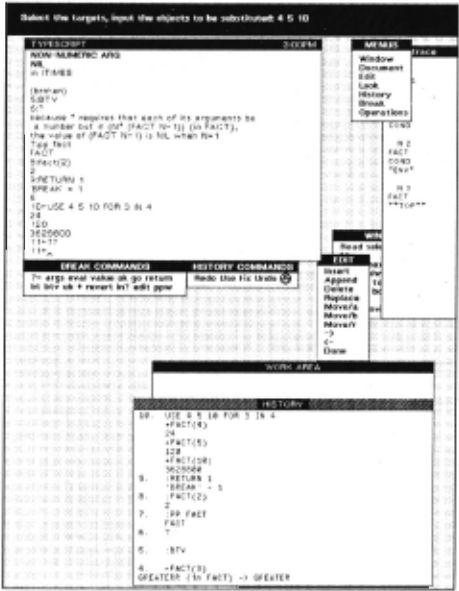
This completes the "toy" session designed to illustrate some of the basic features of the system. Note that at th1s po1nt the display contains nine different windows. Five of these windows are control windows (menus). The other four windows describe various processes. Note that the windows have not been a burden on the user: he docs not "manage" the windows. although he could perform explicit operations on them such as changing their position, or size, or shape, or editing their contents as we have seen. The feeling to the user is that the windows more or less manage themselves, and this contributes greatly to the smoothness of the system.t
Conclusions
The system decribed in this paper has been in use by actual use rs other than the author only a few months. However, our conjectures about the usefulness of this kind of facility were if anything conservative. The ability to suspend an operation, perform other operations, and then return w1th?ut lo,s of context is widely appreciated. The techmque of usmg different windows for different tasks does make this switching of contexts easy and painless.
Even when the user is not switching contexts, the use of multiple windows is extremely helpful. For example, a swndard complaint with conventional di splay terminals is that material that the user wants to refer to rereatedly, e.g., a rrintout of some function, or a record of some co!llp.licated interaction, is di splaced by subsequent, 1nc1d_ental interactions with the system. In this situation when usmg a hard copy terminal, the user simply tears off the po~tion he is interested in and saves it beside his keyboard. Bemg able to freeze a portion of the use r's interactions in a separate window such as the WORK AREA, while allowing subsequent interactions to scroll off the screen seems to combine some of the best aspects of hardcopy and display terminals.
Finally, users just seem to enjoy aesthctic;~lly the style of interacting with the system, such as usmg menus, the feedback via the prompt window and changing cursors. being able to scroll the windows back and forth, etc. We think this is an area that will see an increasing amount of activity in the future as the cost of bit map di splays and the necessary computing power to maintain them continues to drop.
[llob] Bobrow, D. G .. and Wegbreit B., "A Model and Stack Implementation l'or Multiple Environments," Communicalions uf /he ACM, Vol. 16, 10 October 1973.
[Eng] English, W. K., Engelbart, D. C., and llerman, M,; L.., "Display Selection TeclllliCJUCS for Tex t MampulatJOn, 1/::t'E Transacliol!s on Human Fac/ors in E/eclronics, Vol. H FE-8, No. 1, March 1967.
[LRG] Learning Research Group, Personal Dynamic Media Xerox Palo Alto Research Center, 1976. Excerpts publi shed in IEEE Compuler Magazine, March 1977.
'!'The second part of the session. whid1 sho"'s more sophi slicatcd usc of the above fcawres in the context of an aclunl working session involving finding :lnd fixing bugs, testing programs, sending :tnd n:cciving messages, etc., may be found in an expanded version of thi s paper "vailablc as a Xerox CSL Report. A Display Orient ed Programml'l''s Assistant, by Warren Teitetman.
[San] Sandewall. E. "Programming in an Interactive Environment: The Li sp E:.xpcrience," Matematiska lnstitutionen, University of Linkoping, Sweden. (to be published in CACM).
[Spr] Sproull, R. F .. and Thomas, E. L., "A Network Graphics Protocol," Compuler Graphics, SIGGRAPH Quarlerly, Fall 1974.
[Swi] Swinehart, D. . C .. "Copilot: A Multi~!e , Process Approach to Interactive Programming Systems, Stanford Artifici al Intelligence Laboratory Memo AIM-230, Stanford University, July 1974.
[Tei1] Teitelman, W. "Toward a Programming Laboratory," in Walker, D. (cd.) I nlenwlional Join/ Conference on Artificial Intelligence, May 1969.
[Tei2] Teitelman, W. "Automated Programmering - T~e Programmer's Assistant," Proceedings of the Fall Jo111t Co1~puter Conference, December 1972.
[Tei3] Teitelman , W. "CUSP - Conversational Lisp," Third lnternaliunal Joint Conference on Arlificia/ lnlelligence, August 1973.
[Tei4] Teitelman, W. et al., lnler/isp Reference Manual, Dec. 1975, Xerox Palo Alto Research Center.
@inproceedings{ijcai1977p213,
  title     = {A Display Oriented Programmer's Assistant},
  author    = {Teitelman, Warren},
  booktitle = {Proceedings of the Fifth International Joint Conference on
               Artificial Intelligence, {IJCAI-77}},
  publisher = {International Joint Conferences on Artificial Intelligence},
  editor    = {Raj Reddy},
  pages     = {905--914},
  year      = {1977},
  note      = {Languages and Systems},
  url       = {https://ijcai.org/proceedings/1977/213},
}
TY - CPAPER TI - A Display Oriented Programmer's Assistant AU - Teitelman, Warren T2 - Proceedings of the Fifth International Joint Conference on Artificial Intelligence, IJCAI-77 PB - International Joint Conferences on Artificial Intelligence PY - 1977 SP - 905 EP - 914 UR - https://ijcai.org/proceedings/1977/213 ER -Copied
Machine-readable versions of this paper, for tools and AI agents: