Toward a Programming Laboratory
Proceedings of the First International Joint Conference on Artificial Intelligence. Man-machine Symbiosis in Problem Solving. Pages 1-10.
© 1969 International Joint Conferences on Artificial Intelligence
Abstract
This paper discusses the feasibility and desirability of constructing a "programming laboratory" which would cooperate with the user in the development of his programs, freeing him to concentrate more fully on the conceptual difficulties of the problem he wishes to solve. Experience with similar systems in other fields indicates that such a system would significantly increase the programmer's productivity. The PILOT system, implemented within the interactive BBN LISP system, is a step in the direction of a programming laboratory. PILOT operates as an interface between the user and his programs, monitoring both the requests of the user and the operation of his programs. For example, if PILOT detects an error during the execution of a program, it takes the appropriate corrective action based on previous instructions from the user. Similarly , the user can give directions to PILOT about the operation of his programs , even while they are running, and PILOT will perform the work required. In addition, the user can easily modify PILOT by instructing it about its own operation, and thus develop his own language and conventions for interacting with PILOT. Several examples are presented.
- Bobrow, D.G., Murphy, D.L. and Teitelman, W. The BBN LISP System, April 1969.
- Bobrow, D.G. and Teitelman, W. Debugging in an On-Line Interactive LISP, November 1967. Bolt Beranek and Newman Inc 3. Engelman, C. "MATHLAB 68" IFIP Congress 68, pp. B91-B95.
- Johqson, T.E. "Sketchpad III: A Computer Program for Drawing in Three Dimensions," Proc. SJCC, Spartan Press, Baltimore, Maryland. 1963
- Martin, W.A. Symbolic Mathematical Laboratory, Doctoral Dissertation, MIT, Cambridge, Massachusetts, January 1967. (also Report TM-36, Project MAC, MIT)
- Maurer, W.D. "Computer Experiments in Finite Algebra," Comm. ACM, Vol. 9, No. 8, August 1966, pp. 589-603.
- Reintjes, J.F. and Dertouzos, M.L. "Computer-Aided Design of Electronic Circuits," presented at WINCON Confer., Los Angeles, California, February 2-5, 1966.
- Sutherland, I.E. "SKETCHPAD: A Man- Machine Graphical Communication System," Proc. SJCC, Spartan Press, Baltimore, Maryland. 1963
- Teitelman, W. PILOT: A Step Toward Man-Computer Symbiosis, Doctoral Dissertation, MIT, Cambridge, Massachu- setts, June 1966. (also Report TR-32, Project MAC, MIT)
- Teitelman, W. Design and Implementation of FLIP, A LISP Format Directed List Processor, B.BN Report No. 1495, July 1967.
References were extracted automatically from the PDF and may contain errors.
Full text extracted automatically from the PDF; figures, tables and equations may differ. The PDF is the version of record.
Introduction
The research described in this paper focuses on the programmer's environment. This term is meant to suggest not only the usual specifics of programming system and language but also such more elusive and subjective considerations as ease and level of interaction, "forgivefulness" of errors, human engineering, and system "initiative." In normal usage, the word "environment" refers to _the "aggregate of social and cul tural conditions t hat influence t he life of an individual." The programmer's enivron ment influences, to a large extent deter mines, what sort of problems he can (and will want to) tackle, how far he can go, and how fast. If the environment is "co operative" and "helpful" -- the anthropomorphism is deliberate -- then the programmer
can be more ambitious and oroductive. If
TOWARD A PROGRAMMING LABORATORY
Warren Teitelman Bolt Beranek and New~n Inc 50 Moulton Street Cambridge, Massachusetts
not, he will spend most of his time and energy "fighting" the system, which at times seems bent on frustrating his best efforts.
One immediate goal to strive for is an environment comparable to that found in the well designed laboratory of the physical sciences. Such a laboratory usually con tains equipment for many applications as well as facilities for designing and build ing new apparatus, or adapting that alreacy present. In a large (well-funded) install ation, the researcher will also often have available assistants for performing the "routine" tasks. For example, a chemist might simply request an analysis of a sample, and not have to itemize each step in the process. This type of assistant and assistance frees the researcher for problems more worthy of his attention.
Computer based systems have been con structed that create this type of labora tory environment for certain well-defined areas, e.g., mathematics [3,5,6], design of electronic circuits [7], and general ized graphical design [4,8], such as for aircraft, automobiles, bridges, etc.
These systems are or~anized to allow the computer to perform the routine work (where routine is a function of the soph istication of the system) , while the user ~uides and directs the orocess at a rela tively high level. F'o~ example, in the mathematical laboratory developed by Willian Martin, [5], the mathematician interacts with the computer by asking questions or making requests. The system employs ~raphical input and output (li~ht pen and display) to allow the mathematician to operate in an environment that closely resembles the pencil and paper with which he is already familiar. For output, the display utilizes subscripts, and observes the conventions concernin~ physical size, ~rouping , and placement of subexpres sions 'dhich mathematicians have adopted to make it easier to read and comprehend mathemati cal formulae. For input, the mathematician can communicate directly with the computer via the li~ht pen, either by writing new expressions, or by pointin~ to old ones, or portions thereof .
In a typical case, the user might be try ing to find the solution of a differential equation. On the screen are displayed one or two equations, while the user has in his head the name of several other expres sions or partial results already studied and filed away. The user decides to per form an action such as substituting a dis played equation, solving it for some vari able, expanding some subexpression in a certain way, or perhaps asking to see some thing else. He makes the request using a combination of light-pen and key-board signals. These are encoded and transmitted to the system where the appropriate rou tines compute or retrieve the required new expressions and transmit them back to the display routines which then compile and display the desired new picture. In this way, the user can perform in a few minutes a long and involved analysis which, assum ing he did not make any mistakes or lose track of what he was doing, might other wise take him many hours.
This paper describes a step in the direction of such a laboratory for program ming and programmers: the PILOT system. As with the mathematical laboratory, the goal is to allow the computer to perform the routine tasks while the user, in this case a programmer, is left free to concen trate on the more creative aspects of his problem, which is the writing and debugging of a program.
Most of the previous efforts bent at improving the environment of the program mer have concentrated on providing and im proving packages, such as editors, com pilers, trace packages, display routines, etc. While a good deal of effort has been devoted to such facilities in the design of PILOT, the basic innovation of the PILOT system is the emphasis placed on the problem of making changes in programs. The reason for this emphasis is that making changes in programs is the task that oc cupies most of a programmers time and ef fort, from the early stages in the develop ment of programs when they consist primar ily of correcting syntactical and simple logical errors in individual subroutines, to the final stages when the programmer makes the type of logical and organizational changes that affect many different parts of his program.
The problem of making changes to the PILOT system itself is handled as a special case of the problem of making changes in programs in general. Since PILOT is de signed to facilitate making changes in pro grams, its tools and techniques can be ap plied directly to itself in what is essent ially a bootstrapping process. The user can thus easily introduce new tools and/or modify existing ones to suit his own methods and problems, in short, tailor the per formance of the system to suit himself. Futhermore, PILOT is designed with this in mind, so that it can cooperate with the user during this phase of the development.
The PILOT System
-- PILOT is Implemented in the LISP pro gramming language at Bolt Beranek and Newman Inc., Cambridge, Massachusetts. [1] Although there is a PILOT subsystem in LISP, all of the features and tools des cribed in this paper were incorporated directly into the BBN LISP system once their usefulness was established, and are now in general use by the entire community of LISP users. It is thus more meaning ful to view PILOT as a conceptual system, a philosophy of design. It is this philo sophy that we are trying to impart, in the hopes that it may prove useful in the de sign and construction of systems in other languages. ( *)
Automatic Error Correcting
The initial stages in the implementa tion of a large program are usually devot ed to the writing and debugging of inde pendent component routines. Only after these have been checked out, at least superficially, can the programmer begin to assemble the program and check for inter routine problems. However, before the pro grammer can even begin to debug a routine, he must first get it to run, i.e., elimi nate those syntactical and/or simple logi cal errors that cause complaints from the language or system in which he is operat ing. Facilitating the correction of these lowest-level errors would improve the ef ficiency of debugging by allowing the pro grammer to proceed directly to higher level problems.
From the user's standpoint, clearly the best of all possible solutions would be for the system to correct these low level errors automatically and continue with the computation. This is not far fetched: a surprisingly large percentage of the errors made by LISP users are of the type that could be corrected by a nother LISP programmer without any infor mation about the purpose or application of the LISP program or expreesion in question,(*) e.g., misspellings, certain types of parenthesis errors, etc. If these corrections were performed automatically by a program that was called only when (after) an error occurred in the execution of a LISP program, it would in no way de tract from the performance of the LISP sys tem with debugged programs. Thus the ef ficiency of the error correcting program would not be a critical factor in its use fulness.
(*) LISP is especially suited for imple menting a system such as PILOT because of the ease with which LISP programs can be treated as data by other programs. This capability is essential for creating tools which themselves will create and/or modify programs, an indispensible feature of a programming laborabory.
A primitive program which corrected certain types of spelling errors was im plemented in PILOT and users were encour aged to experiment with it and comment on its features. As a result of this experi ence, we discovered that in order to be acceptable to users:
- The program must have a measure of how certain it is about the nature and cor rection of a mistake, and use this measure in determining the amount of interaction with the user.
- The program must be able to distin guish between significant and trivial corrections, and to be more cautious, i.e., more interactive, about correcting the former.
- The user must be able to specify to the program his degree of confidence in its ability to correct his mis takes, as reflected by the amount of interaction he desires.
- The user must be able to interrupt and/or abort any attempted correction.
- The user must be able to disable or overrule the entire correcting program if or whenever he wishes.
With these criteria in mind, a more sophisticated set of error correcting routines were implemented. These routines make up the DWIM package, for Do-What-! Mean. The following output is represent ative of the kind of corrections and flavor of interaction of DWIM. User input is pre ceded by an arrow(+),
In this example, the user first de fines a function FACT of one argument, N, whose value is to be N factorial. The function contains several errors: TIMES and FACT have been misspelled. The 9 in N9 was intended to be a right parenthesis but the teletype -shift key was not depress ed. Similarly, tne 8 in 8SUB1 was intend ed to be a left parenthesis. Finally, there are two left parenthesis in front of ·the T that begins the second clause in the conditional, instead. of the required one.
(*) We conjecture that this is also true in other languages.
~DEFINE(((FACT (LAMBDA (N) (COND ((ZEROP N9 1) ((T (TIMS N (FACTT BSUB1 NJ (FACT) ~PRETTYPRNT((FACCT)) =PRETTYPRINT =FACT (FACT (LAMBDA (N) (CONn ((Z~ROP N9 1) ((T (tiKS N (fACTT BSUB1 N)))))))) NIL ~FACT(3) EDITING FACT ··· N9 >>--> N) EDITING FACT ··· (COND -- ((T --))) >>--> (CONO -- (T --)) TIMS=TIMES FACTT=FACT EDITING FACT ··· 8SUB1 >>--> (SUB1 6 ~PRETTYPRINT((FACT)) (FACT (LAMBDA (N) (CONO ((ZE~OP N) 1 l (T (TIMES N (FACT (SUB1 N))))))) NILAfter defining the function FACT, the user wishes to look at is definition usinr PRETTYPRINT, which he unfortunately mis spells. Since there is no function PRETTY PRNT in the system, an UNDEFINED FUNCTION error occurs, and the DWIM program is called. DWIM invokes its spelling cor :ector, which searches for the best pos sible match a list of functions frequently used (by this user). Finding one that is extremely close, DWIM proceeds on the as sumption that PRETTYPRNT meant PRETTY PRINT, informs the user of this, and calls PRETTYPRINT.
At this point, PRETTYPRINT would normally print (FACCT NOT PRINTABLE) and exit, since FACCT has no definition. This is not a system error condition, but the DWIM facility is not restricted to just error conditions. DWIM modifies selected system functions, such as PRETTYPRINT and DEFINEQ, to make them cooperate more with the user. DEFINEQ is modified (by ADVISE, to be described later) to note any new functions defined by the user, and add them to the spelling list of user function~ Similarly, PRETTYPRINT is modified so that when given a function with no definition, it calls the spelling corrector. Thus, PRETTYPRINT determines that the user wants to see the definition of the function FACT, not FACCT, and proceeds accordingly.
The user now calls his function FACT. During its execution, five errors are gener ated, and DWIM is called five times. At each point, the error is corrected, a com ment made of the action taken, and the computation allowed to continue as if no er ror had occurred . Following the last cor rection, 6, the value of FACT(3), is print ed. Finally, the user prints the new, now correct, definition of FACT.
In this rarticular example, the user was shown operating in a mode which gave the DWIM system the green light on all cor rections. Had the user wished to interact more and approve or disapprove of the in tended corrections at each stage, he could have operated in a different mode. Or, operating as shown above, he could have at any point aborted the correction or sig nalled his desire to see the results of a correction after it was made by typing a ? on the teletype.
We have found from our experience with DWIM that most users are quite willing to entrust the program with the correction of errors although each different user may > II fi want to operate with a different con - dence factor," a parameter which indicates how sure DWIM must be before making a cor rection without approval. Above a certain user-established level, DWIM makes the cor rection and goes on. Below another level, DWIM types what it thinks is the problem, e.g., DOES PRTYPNT MEAN PRETTYPRINT ?, and waits for the user to respond. In the in between area, DWIM types what it is about to do, pauses for about a second, and if the user does not respond, goes ahead and does it. The important thing to note is that since an error has occurred, the user would have to intervene in any event, so any attempt at correction is appreciated, even if wrong, as long as the correction does not cause more trouble than the orig inal to correct. Since DWIM can recognize the difference between trivial corrections, such as misspellings, and serious correct ions, such as those involving extensive editing, bad mistakes are usually avoided. When DWIM does make a mistake, the user merely aborts his computation and makes the correction he would have to make any way.
Error Handling in General
Certain types of errors that occur in the BBN LISP system cannot be handled by the DWIM program, e.g., NON-NUMERIC ARG, an error generated by the arithmetic functions, ARG NOT ARRAY, from the primi tive array functions, etc. These are data type errors.(*) Another class of errors not handled by DWIM are the "panic" errors: BP FULL, a complaint from the compiler meaning it has run out of binary program space; NONXr~EM , an attempt to reference non- existent memory, usually caused by treating an array pointer as a piece of list structure; PDL OVFLW meaning pushdown list overflow, which usually implies a looping program, etc . Both data type and panic errors are not fixable, but they are helpable .
In our system, whenever an error occurs, it causes a trap to a user-modi fiable program. (It is through this pro gram that DWIM works.) If DWIM has not been enabled, or if the user aborts an at tempted DWIM correction, or if DWIM can not fix the error that has occurred, the system goes into a "break" and allows the user to interact with the system while maintaining the context of the program in which the error occurred. This allows the user to intervene to try to rectify the problem, or to salvage what he can of the computation. While in . the break, the system accepts and evaluates inputs from the teletype. Since all of the power of the system is available to him, the user can examine variables, change their values, define and evaluate new functions, and even edit functions he is currently in. If another error occurs in a computation re quested while in the break, the system goes into a second, lower break, and so on. Thus it is rarely the case that the results of a lengthy computation are lost by the occurrence of an error near its end.
The following example illustrates this process (user input is preceded by":" or "*"). The user is running a large account ing system, one of.whose subroutines is to perform the alphabetization of a list of names. The first indication of the pre sence of a logical error in the system ~s the message ATTEMPT TO CLOBBER NIL, mean ing the program is attempting to change the value of NIL . The system goes into a break (1), and the user tries to determine where the error occurred by performing a backtrace (2). He sees that he is in the function ALPHA, interrogates the value of some of ALPHA's variables ( 3), and realizes that the problem arose when his alphabeti zation routine attempted to compare the last element in the list to the one follow ing it, i.e. and end-check problem. While still in the break, he proceeds to edit the function ALPHA (4), DWIM corrects his spelling, and since ALPHA happens to be compiled, the editor retrieves its de fining symbolic expression from its pro perty list, typing PROP (5) to call this to the user's attention. Consulting his listing, the user instructs the editor to find the expression beginning with COND that contains RETURN, (6) which he then prettyprints (7).The expression he wants is the one before this one, so he backs up (8), and makes the appropriate correction (9).He then recompiles ALPHA (10).
(*) Sometimes these errors are in fact caused by misspellings, but it is impossi ble to tell in general .
| ATTEMPT TO CLOBBER NIL TEITELMAN IN RPLACA | |
| (RPLACA BROKEN) :BT RPLACA TILPHA ACCOUNTS2 ACCOUNTS1 ACCOUNTS | 1 2 |
| :X (BOBROW QUILLIAN MURPH~ RELL NIL) : y (NIL) : z | 3 |
| TEITELMAN :(EDI 'l'F ALHPA) =ALPHA | 4 |
| PROP EDIT | 5 |
| •(COND CONTAINING RETURN) | 6 |
| PP (COND (FLG (GO LP)) (1' (RE'£URN X))) | 7 |
| •BACK PP (NULL (SETQ Y (CDR Y))) | 8 |
| •(EMBED SETQ IN CUR) •PP (CDR (SETu Y (CUR Y))) •OK (ALPHA) | |
| :(COMPILE (QUOTE (ALPHA))) LISTUG? ST (OUTPUT FILE) NONE (ALPHA COMPILING) (ALPHA REDEFINED) (ALPHA) :?= | 10 ll |
| :(SET\.! lJ 1l (NIL) . | |
| U = NlL V = 'l'JHTELMAN | 12 |
| :EVAL RPLACA EVALUATED :VALUE (TEITl:LMANl | 13 lil |
| :X (BOBROW QUILLIAN MURPHY BELL | TEITELMAN) |
| :OK | 15 |
Now the user wishes to proceed with the computation, and so must correct the immediate error situation in the function RPLACA. He interrogates the value of RPLACA'S arguments by typing?= (11), and changes the first argument to the v~lue of Y (12). He then evaluates RPLACA (13), checks its value (14), and releases the break by typing OK (15).
As illustrated above, when an error occurs a user invariably wants to "look back" and see what happened earlier in the computation to cause the error situation. In BBN LISP, all information regarding the state of the computation in progress is stored on the push-down list and is ex plicitly available to the user and to user programs. In fact, without this capabil ity, DWIM could only be used to correct certain trivial errors. We believe that for any type of programming laboratory environment, it is absolutely essential that programs be able to examine the state of the world at any point in the computat ion. In terms of LISP, this implies being able to examine the sequence of functions that have been called, and looking at vari able bindings. Since the same variable may be bound in nested function calls a number of times, expecially during a re cursive computation, the program must be able to spe~it::v whic.h binding of a vari able it is referencing and be able to change a particular binding if necessary. For example, had X and Y been the name of RPLACA's arguments, the user should still be able to interrogate the value of X and Y in ALPHA. Finally, the program must be able ro-cause the computation to revert back to a specified place on the push-down list regardless of the number and type of intervening functions that have been called All of these capabilities are present in our system.
User Breaks
The capability of stopping a compu tation and maintaining its context while executing teletype inputs is also directly available to the user as an aid in debug ging in a variety of forms. [2] In the simplest case, the user can request that selected functions be modified to cause breaks whenever they are called~ or unly when a certain condition is satisfied, e.g .. (BREAK ALPHA (GREATERP (LENGTH X) 10)) will cause the alphabetization routine to break whenever it is given a list of len~ greater than 10. At this point the user can intervene and examine variables, edit functions, etc. exactly as with the case when an error occurs and the system causes a break.
Another way of using the break feature is to specify that a function be "broken" only when it is called from some parti cular function. For example, the user would be reluctant to break on the function SETQ, since almost every function uses it. However, he could (BREAK (SETQ IN ALPHA)), which would only break on calls to SETQ from within ALPHA. This is performed by calling the editor to find and modify all calls to SETQ inside of the function ALPHA. Thus the performance of SETQ is not af fected or degraded when called from any other function.
The user can also request that breaks be inserted at specified points inside of a function. The editor is then called (in this case the function must be an interpre ted one, i.e. have an S-expression definit ion)to find the appropriate point and insert the break. For example, the user could (BREAKIN ALPHA (BEFORE (COND CONTAINING RETURN))), which would cause a break just before executing the indicated form. Al ternatively, he can call for a break by ~sing the function HELP.
Finally, the user can request a break at any time during a computation by simply depressing a special key on the teletype. The next time a function is called, usual.l,y within a few milliseconds, a break will occur., and again the user can intervene and examine the state of the computation, etc. These capabilities are invaluable for lo calizing problems in complex programs, especially recursive ones, and are powerful tools for finding where to make changes that complement those described below that provide how to make changes. ·
Advisinf
PI OT was originally motivated by the difficulties encountered in using comi)uters for solving very hard problems, partic-ular ly those in the area of artificial intel ligence.[9) These problems can be char acterized as being extremely difficult to think through in advance, that is, away from the computer. In some cases, the pro grammer cannot foresee the implications of certain d~cisions he must make in the de sign of the program. In others, he can compare several alternatives only by try ing them out on the machine. Even after he gets his program debugged, he continues to make alterations to see the~fects. Only by experimenting with his working pro gram can he evaluate its performance or hope to extend its generality. Since he cannot accurately predict the effect of changes on the behavior of the program because of its size and complexity, he must adopt the more pragmatic policy of "let's try it and see what happens." In short, he must be able to treat the computer as his laboratory.
Unfortunately, making changes in pro grams, especially large and complex pro grams, is often not a simple matter. Sinre they may require so much effort, many ex perimental changes are simply not imple mented, with the result that the programs soon become "frozen." For this reason, considerable attention and effort in the design and development of PILOT has been devoted to the problem of making changes. One of the results is the concept of advising.
The operation of advising consists or modifying the interface between individual functions in a program, as opposed to mod ifying the functions theffiselv~s, which is called editing. The advantage of advising is that it allows the user to treat sect ions of his own (or someone else·s) program as "black boxes," and to make modificat ions to them without concern for their contents. Since each modification is it self a small program, and modifications can be inserted so as to operate either before or after the original function would be run, advising is a very general and powerful concept.
Advising is carried out in LISP by creating a new function definition in which the original function definition is embedded, and surrounded by the "pieces of advice." ',I'his procedure is completely general: the function being advised can be arbitrarily large or small, complex or simple, compiled or interpreted, a system function or one of the user's own.
MODIFIED FUNCTION
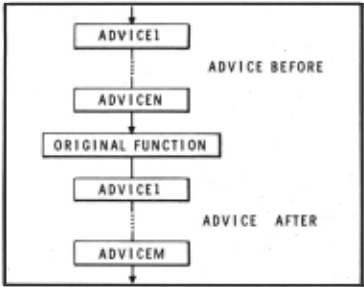
The individual pieces of advice are each LISP expressions, and so they to are completely general. Thus a piece of ad vice may simply change the value of some ,variable, or, at the other extreme, request a lengthy computation including perhaps calling the entire advised function recur sively. Advice can also be given so as to bypass the entire advised function.
For example, the user could have re paired the problem in ALPHA shown earlier by giving the appropriate advice to RPLACA instead of editing ALPHA. Since RPLACA is called from many functions, the user would probably want to advise RPLACA IN ALPHA:
ADVISE((RPLACA IN ALPHA) (COND ((NULL U) ( SETQ U Y) ) ) )
As with break, this would only modify the call to RPLACA from within ALPHA.
This operation demonstrates the advan tage of advising. It allows the user to make online modifications quickly and simply. In addition to using it for cor recting bugs, the user can perform modi fications for the sake of experimentation, undo the modifications if he wishes, try out other configurations, etc., all with out disruption to his high-level, problem oriented train of thought. Such disruption usually follows when implementing changes requiring a lengthy sequence of operations.
Note that advising complements rather than competes with editing as a way of making changes. In the early stages of d~ bugging, the user is primarily attending to local phenomena in his program, and thus may find it natural to make changes by editing. In later ~tage~, he considers his program more in terms of what each piece does, rather than how it does it, and here advising is the tool he wants to use for making changes.
Advising as a Tool for Modifying the System Advising not only provides the user with a convenient tool for making changes in his own programs, but also with the· means for experimenting with and tailoring the system to his own particular tastes. For example, suppose a user wished to n~ od ify PRETTYPRINT to print comments along the right had side of the page, where a comment was to be indicated as an express ion beginning with the atom *· Knowing that SUPERPRINT is the function that "does the work" of prettyprinting, he could
ADVISE(SUPERPRINT (COND ((EQ (CAR E) (QUOTE *)) (RETURN (COMMENT E)))))
and then define the function COMMENT to do the appropriate formatting. (*)
(*) The comment feature is now a part of our system. However, it was initially in troduced in precisely this way, in order to evaluate its usefulness. Advising thus provides system designers with a quick means for trying out new features.
Admittedly this particular piece of advising requires the user to have some detailed knowledge of the workings of PRETTYPRINT. However, the important point is that by using ADVISE, changes can be easily effected, even with system functions where changes were not anticipated.
Conversational Input
PILOT- ca:n~vTewed as an interface between the user and his programs. The following somewhat over simplified diagram illustrates the user-PILOT-program con figuration:

Most of the effort in PILOT is con centrated at interface 2 and 3. However, in order to be really effective, a pro gramming laboratory should not only pro vide the means whereby changes can be ef fected immediately, but also in·~ way that ~natural to the ~· Accordingly, we have been experimenting with an English to-LISP translating program that operates at interface 1, and translates the user's requests to PIT~T into the appropriate LISP computation. The following dialogue gives the flavor of user-PILOT interactions obtained with this program. User input is preceded by">."
.. PILO'I(Tl
PROCEJ::D:
>TELL PROGRESS: If THJ:: CANNIBALS OUl'NUMBER THE MlSS!O~ARIES ON SlDE1, OR THE CANNIBALS OJTNUMB!R TH~ MISSIONARIES ON SIDE2, THEN RET11RN FALSE,
THE CANNibALS OUTNUMBJ::R THE MISSIONARIES ON SillE 1 ?"?
>THE X Ol i TNW1BER l'HE X ON Z MEANS ( IS CONl'AIJKD IN Z AND THE NUMBER OF X IN Z IS �R~ATER l'HAN THE NUMBER OF y IN Z,
~HE ~UM~ F R OF X IN Z t?
>DEFINE NUMBFR, X Y, AS PROG (N) SEl" N TO /l i LP: If Y IS EMPrY THEN RETURN N, H' X IS E:Q11AL TO '.L'HE FIRST MENSER OF Y THEN INCHEMENT N; SJ::T Y TO THE HEST OF Y; GO Tn LP, (NUMSJ::R) >THE NU~R~R Of X lN Z MEANS NUMBER X Z, I UNDEFSTHLl, >CONTINUE: I UNOERSTHlJ, >CONTlNUf
Pi:lOGRJ:;S:>
The user instructs PiLOT to advise the function PROGRESS with the statement beginning "TELL PROGRESS:." PILOT re cognizes this form of request, but does not understand the part about outnumbering . The user t hen attempts to explain this with the input beginning THE X-OUTNUMBER THEY. This statement will cause an ad dition to PILOT's already fairly extensive capability for converting English state ments to LISP, so that PILOT will be able to understand expressions of this type en countered in the future. However, PILOT cannot interpret the phrase THE NUMBER OF X IN Z in this explanation, and so inter rogates the user at this lower level. At this point, the user defines a new function NUMBER, and then explains the troublesome phrase in terms of this function. PILOT responds that it "understands." The user then instructs PILOT to continue with what it was doing , namely translating the ex planation of OUTNUMBER. When this is com pleted, the user instructs PILOT to con tinue with the original request, which PILOT now successfully completes.
The current English-to-LISP translator contains a large assortment of useful, if ad hoc, transformational rules written in FLIP, [10], a string processing language embedded in the BBN LISP system. The set of FLIP rules can be easily expanded or modified. For example, the dialogue shown above resulted in rules for transforming expressions of the form THE X OUTNUMBER THE Y ON Z and for THE NUMBER OF X IN Z being added to the translator
In addition to the FLIP portion of the translating program, there is a post processor which allows intermingling of LISP expressions with the English, as well as a sort of pidgin-LISP which looks like LISP with the parentheses removed. The translator also contains specialize infor mation for dealing with quantifiers and and-or clauses. For example, the following expressions will be translated correctly into the equivalent LISP forms.
NO MEMBER OF X IS ATOMIC AND NOT NULL THE FIRST ELEMENT OF X IS GREATER THAN THE SECOND AND NOT LESS THAN THE THIRD
THE FIRST ELEMENT OF SOME MEMBER OF X IS A NUMBER THAT IS GREATER THAN THE SECOND ELEMENT
The translator also "remembers" cer tain contextual information such as what was the last operation requested, what function it referred to etc. For example:
>TELL FOO: IF ITS FIRST ARGUMENT IS ATOMIC THEN RETURN IT. FOO
>WHAT IS I'rS SECOND ARGUMENT? y
We are not asserting that English is a good or even desirable programming language. However, if the user is think ing about his programs in English, then providing him the facility for expressing requests in English will allow him to concentrate more fully on the problem at hand.
Impr~ving PILOT
"PILOT is the result of an evolution ary process extending over more thari two years. However, there is no reason to assume that this process has terminated, nor that PILOT has reached some sort of ultimate state." [9] This statement was written in my Ph.D. thesis three years ago, and in the elapsed time, many of the goals established for improvements and additions to PILOT have been realized in our present system. But the statement is still true, and the process still continues.
One area of current interest is that of program-writing programs. Programming languages are .currently designed to allow the programmer to express the operations he wants the computer to perform in a simple and concise fashion. However, often the programmer many not know precisely what operation he wants the computer to perform, although he may have a clear idea of what he wants the program to accomplish. That is, he may be able to give a description of its output, or the changes it should make in a data structure. This is not to say that the programmer could not con struct the program. However, a system which could accept more goal-oriented descriptions of tasks and produce programs to accomplish them, even if only effective for simple, subroutine-level tasks, would further free its users for high-level operations. Such a system would require a fair degree of problem solving capabil ity, and should have a sufficiently rich store of information about programming and programs to enable it to determine similarities in tasks. It should be able to adapt previously written or construct ed programs to a new task. In other words, we are trying to construct a system that can handle more of the routine aspects of programming, in order to free the human to concern himself more with the creative aspects of the problem. This is the basic philosophy of the PILOT system: let the computer do it. The significance . of PILOT is that it demonstrates this feasability and desirability of ths approach. Even in its current form, PILOT clearly shows that it is possible to get computers to participate in, and cooperate with, research efforts in programming to a much greater extent than is now being done.
@inproceedings{ijcai1969p1,
  title     = {Toward a Programming Laboratory},
  author    = {Teitelman, Warren},
  booktitle = {Proceedings of the First International Joint Conference on
               Artificial Intelligence, {IJCAI-69}},
  publisher = {International Joint Conferences on Artificial Intelligence},
  editor    = {Donald E. Walker and Lewis M. Norton},
  pages     = {1--10},
  year      = {1969},
  month     = {5},
  note      = {Man-machine Symbiosis in Problem Solving},
  url       = {https://ijcai.org/proceedings/1969/1},
}
TY - CPAPER TI - Toward a Programming Laboratory AU - Teitelman, Warren T2 - Proceedings of the First International Joint Conference on Artificial Intelligence, IJCAI-69 PB - International Joint Conferences on Artificial Intelligence PY - 1969 SP - 1 EP - 10 UR - https://ijcai.org/proceedings/1969/1 ER -Copied
Machine-readable versions of this paper, for tools and AI agents: